





Get 1 Free Stock Worth Up To $200 From Robinhood!
Sign up with Robinhood, deposit any amount and get 1 Free Stock. It takes less than 3 minutes to sign up and claim your Free Stock Bonus.
Earn 5.00% APY with M1 High-Yield Savings Account
M1 Plus members can earn 5.00% APY on their deposits with no minimum balance required.
Webull free stock promotion
Get Up To 5 Free Stocks From Webull
Open a new Webull brokerage account today and deposit any amount of money to receive 5 free stocks. Webull offers commission free stock, ETF, option and crypto trading.
Written By: Ryan Scribner on Nov 30, 2023
» 6 min read
Category: 
FTC Disclosure: Some of the links on this site are affiliate links. Read our full disclaimer here.

How To Transfer From Merrill Edge To M1 Finance

Transferring your investments from one brokerage to another may seem like a daunting task. However, it has become easier than ever to move your assets thanks to streamlined industry regulations and modern platforms.

M1 Finance now manages over $12 billion in client assets across more than 1,000,000 user accounts. The platform has refined the account transfer process, making it secure, straightforward, and user-friendly.

In this article, we'll guide you through the updated steps to transfer your account from Merrill Edge to M1 Finance. Our walkthrough covers fees, timelines, supported securities, important pre-transfer steps, and what to expect after moving your assets.

Before You Transfer: Checklist

  • Gather your most recent Merrill Edge statement (you'll need your account number).
  • Ensure you have an open M1 Finance account—it must match the type of your Merrill Edge account (e.g., Roth IRA to Roth IRA).
  • Review which securities in your account are supported by M1 (see details below).
  • Prepare to liquidate or transfer out unsupported assets (e.g., mutual funds, options, fractional shares).
  • Understand that trading in your transferring account will be restricted for 4–7 business days during the transfer.
  • Contact Merrill Edge to confirm any closure or miscellaneous fees in addition to the standard ACAT fee.
  • Have your banking information ready to link to M1 if you plan to add funds during/after the transfer.

Check out my video on how to transfer your brokerage account below.


Fees and Considerations

Merril Edge

  • Merrill Edge charges an ACAT (full account transfer) fee of $49.95.
  • No charge for partial account transfers from Merrill Edge.
  • M1 Finance does not charge any incoming transfer fee. You may incur additional closure or miscellaneous fees on the Merrill Edge side; check with their support for a full fee schedule before initiating.
  • Ongoing fees: After your transfer, M1 charges a $3 monthly maintenance fee for accounts with less than $10,000 in assets (excluding those with an active margin loan or M1 credit card). No trade commissions or management fees for self-directed investing. Merrill Edge has a separate fee structure by account type - review their schedule for details.

Expected Transfer Timeline

  • Most ACAT (Automated Customer Account Transfer Service) transfers between U.S. brokerages—including Merrill Edge to M1—take 4–7 business days to complete. Some may be faster or slower depending on account complexity or documentation discrepancies.
  • ACATS improvements: As of October 2025, the industry-standard ACATS transfer cycle has been reduced by one day, making transfers slightly quicker than in previous years.
  • Trading is typically restricted on the positions being transferred during the ACATS process.

What Securities Can You Transfer?

M1 Finance supports the transfer of the following assets:

  • U.S.-listed stocks and ETFs (from NYSE and NASDAQ markets)
  • Whole shares only (fractional shares must be liquidated at Merrill Edge; cash from sale will transfer instead)

You cannot transfer:

  • Fractional shares (these must be sold at Merrill Edge prior to transferring)
  • Mutual funds
  • Options contracts
  • Individual bonds, treasury securities
  • Cryptocurrencies
  • Foreign securities, OTC, or pink sheet stocks

If you hold these assets at Merrill Edge, you may need to liquidate or transfer them to another platform before moving the remainder of your portfolio to M1.

SIPC & FDIC Account Protections

M1 Finance brokerage accounts come with SIPC insurance protection up to $500,000 (including $250,000 for cash claims). Cash in M1’s Spend (checking) and Save (high-yield savings) accounts is FDIC-insured up to $4.75 million thanks to partner banks, providing an added layer of protection.

These federal protections apply to both your assets in transit and after your transfer is complete.

Comparison: Merrill Edge vs. M1 Finance

Feature Merrill Edge M1 Finance
Trading Commissions $0 stocks/ETFs $0 stocks/ETFs, automated pies
Mutual Funds Support ✅ Yes ❌ No
Options Trading ✅ Yes ❌ No
Fractional Share Trading ❌ No ✅ Yes (for new buys, not transfers)
Automated Rebalancing Manual ✅ Yes, auto rebalancing
Integrated Bank/Checking Via BofA ✅ M1 Spend, high-yield accounts
Margin Rates Varies, see Merrill schedule Competitive, ~5.65%-6.5%
Advanced Trading Tools MarketPro, research, limit orders Pie-based investing; limited advanced order types
Research/Market News Full Merrill Lynch research News Snapshot (curated market news)
Minimum Balance to Avoid Fees None for standard brokerage <$10k = $3/month
Customer Support Phone, chat, in-branch Online, scheduled calls
Account Protections SIPC, FDIC via BofA SIPC, FDIC (Spend/Save)

How to Transfer From Merrill Edge to M1 Finance: Step-by-Step

1. Open an M1 Finance Account

The first step in transferring your Merrill Edge account to M1 Finance is to create an M1 Finance account if you don't already have one.


You will need to provide personal information, verify your identity, and open the same account type as you currently have at Merrill Edge (for example, a Roth IRA must be transferred to a Roth IRA, not a taxable brokerage).

2. Initiate the Transfer

Once you have your M1 Finance account set up, log in using either the M1 mobile app or on the web platform:

  • On Mobile: Click on "Invest" in the bottom menu to access your portfolio. In the upper left, tap the three horizontal lines to open the main menu.
  • On Web: Go to the "Move Money" section from your dashboard.

Scroll through the menu options until you find "Transfer an account to M1". Click to begin the transfer process.
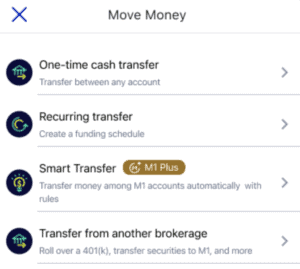
M1 Finance account transfer

3. Choose Account Type

You’ll be prompted to select the type of account you’re transferring:

  • Full Brokerage Account Transfer – Move your entire account in-kind from Merrill Edge to M1.
  • Partial Brokerage Account Transfer – Only certain assets or positions will be transferred.
  • Retirement Account Transfer – Transfer a Traditional/Roth IRA, 401(k) rollover, or other retirement accounts.

Important: The account at M1 must be the same type as your Merrill Edge account—taxable to taxable, Roth IRA to Roth IRA, etc. If you don’t have the correct account type at M1, you’ll need to open one before proceeding.
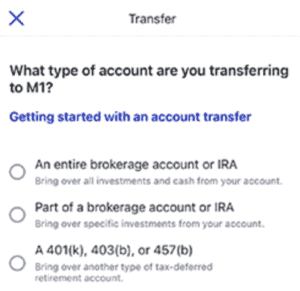
M1 Finance Account Transfer

Retirement account note: If you're rolling over a 401(k) or 403(b) from a former employer, request a "direct rollover" (trustee-to-trustee transfer) with your plan administrator and use M1's provided account details. Do not withdraw the funds yourself, as this may trigger taxes and penalties. This specific process may take 7–14 business days, and you'll need to coordinate documentation directly between the plan administrator and M1.

4. Choose Your Broker

Next, you’ll be shown a list of brokerages to transfer from. If you don't see "Merrill Edge" in the list, use the search bar to find it. Select Merrill Edge as your current brokerage.
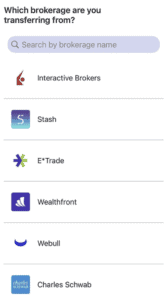
M1 Account Transfer

Enter your Merrill Edge account number exactly as it appears on your most recent statement.

Tip: Double-check for typos or transposed digits. An incorrect account number may delay or void your transfer.

5. Initiate the Transfer

After you enter your account number and confirm your details, authorize the asset transfer by following the on-screen prompts and providing e-signature if prompted.

Double-check all details—transferring the wrong account type or unsupported assets can result in delays or incomplete transfers.

Once submitted, your transfer will be processed through ACATS. Trading will be paused on the moving assets during the 4–7 business day window.

After completion: Confirm that all expected assets (and cost basis information) have successfully moved to your M1 account. If any cost basis data is missing after 30 days, contact M1 support to coordinate with Merrill Edge.


What to Expect After Your Transfer

  • Successful transfer rate: M1 has facilitated the transition of billions in assets from competitors, including hundreds of millions from major brokerages like Fidelity, TD Ameritrade, and Vanguard, demonstrating reliability.
  • New features: M1 now offers News Snapshot (personalized market updates for your holdings), portfolio benchmarking tools (including Time-Weighted Rate of Return), and advanced portfolio performance metrics—helping you monitor your investment strategy over time.
  • Integrated banking: With M1 Spend and Save, you can manage checking and high-yield saving alongside your investments on one dashboard.

Tax Considerations after Transfer

Cost basis information (your security's purchase price) should transfer along with your assets. This is critical for capital gains tax reporting when you sell. Most basis information arrives within 30 days of the completion of the transfer—monitor your account history and contact M1 if anything is missing.

Regulatory Protections

Your transfer proceeds through the ACATS system, regulated by the National Securities Clearing Corporation and FINRA. As an investor, you have the right to transfer your account efficiently and securely between registered U.S. brokerages.

Support and Resources

  • Contact Merrill Edge before transferring to clarify all applicable fees and asset eligibility.
  • If your transfer experiences delays beyond 7 business days, reach out to support at both brokerages for an update.

Ready to start? Open your M1 Finance account and initiate your transfer whenever you’re ready.

Article written by Ryan Scribner
Ryan Scribner is the Co-Founder of Investing Simple and author of From Side Hustle To Main Hustle To Millionaire. He is also a host on the NerdWallet YouTube Channel and runs a successful personal finance YouTube channel he launched in 2016. Ryan has been featured in The Wall Street Journal, MarketWatch, Business Insider, and Forbes, which named his channel the #1 Must-Watch YouTube Channel for Making Money. Recognized as a Top 100 Money Expert by GoBankingRates + MoneyLion and selected again in 2025 — Ryan shares insights based on his own investing journey to help others build wealth.

Read more

Power Your Investing

Choosing the right product and service is essential for your investing. Here are some of the tools and services to help your portfolio grow.
Robinhood
Robinhood provides an easy-to-use commission free trading platform for beginner investors. Robinhood has $0 account minimums. Get a free stock when you open an account below. Limitations Apply.
Try Robinhood
M1 Finance
M1 Finance offers a free investing platform where users can build portfolios of stocks and ETFs. Users can also choose from a variety of pre-built portfolios offered for free.
Try M1 Finance
Fundrise
Passively invest in private real estate deals with as little as $10. Fundrise allows you to own residential and commercial real estate across the U.S. starting at a 1% annual fee.
Try Fundrise
Copyright © 2018 – 2026 Investing Simple LLC. All Rights Reserved.
Investing Simple is a financial publisher that does not offer any personal financial advice or advocate the purchase or sale of any security or investment for any specific individual. Members should be aware that investment markets have inherent risks, and past performance does not assure future results. Investing Simple has advertising relationships with some of the offers listed on this website. The information on Investing Simple could be different from what you find when visiting a third-party website. All products are presented without warranty. For more information, please read our full disclaimer.
Website managed by Stallion Cognitive®
magnifiermenuchevron-downcross-circlechevron-down-circle
linkedin facebook pinterest youtube rss twitter instagram facebook-blank rss-blank linkedin-blank pinterest youtube twitter instagram