Open a new Webull brokerage account today and deposit any amount of money to receive 5 free stocks. Webull offers commission free stock, ETF, option and crypto trading.
FTC Disclosure: Some of the links on this site are affiliate links. Read our full disclaimer here.
How To Transfer From Charles Schwab To Robinhood
If you're looking to transfer your assets from Charles Schwab to Robinhood, this comprehensive guide covers every step, fee, and critical tip you need to know—based on the latest brokerage industry updates. Robinhood just rolled out new features like Robinhood Social, AI-driven indicators, and futures trading on Robinhood Legend, making it an even more compelling destination for investors who want to consolidate or move their portfolio.
This process uses the ACATS (Automated Customer Account Transfer Service), which is reliable and secure—but there are important details to watch for regarding account eligibility, which assets transfer, key fees (+ ways to get reimbursed), and potential tax considerations.
Check out my video on how to transfer your brokerage account below. Let's dive in!
Pre-Transfer Checklist: How To Prepare for an ACATS Transfer
Ensure all trades in your Schwab account are settled (generally T+2 for stocks and ETFs).
Turn off DRIP (dividend reinvestment programs) before initiating your transfer.
Check your Schwab account type: Robinhood accepts only individual, joint, Traditional IRA, or Roth IRA. (Transfers from trusts, business, or custodial accounts are not supported.)
Verify that the account owner names match exactly between Schwab and Robinhood. Any mismatch will cause a transfer rejection.
Have enough cash to cover Schwab’s transfer fee ($50 for full transfer – see below for Robinhood’s reimbursement offer!).
Review your holdings for non-transferable assets:
Proprietary Schwab mutual funds or money market funds will not transfer.
Fractional shares are automatically liquidated and sent as cash (creates a taxable event); Robinhood only receives whole shares.
Options contracts only transfer if not expiring in 7 days and if you have approval at Robinhood (see more below).
Cryptocurrency, foreign stocks, and alternative investments cannot transfer via ACATS and must be liquidated or managed separately.
Find your Schwab account number (8 numeric digits; shown on statements and within your Schwab online account).
Transfer Fees (And How To Get Them Reimbursed!)
Charles Schwab: Charges a $50 fee for a full account transfer and $0 for partial account transfers.
Robinhood: Accepts incoming ACATS transfers for freeand reimburses up to $75 of your transfer fee for incoming transfers of $7,500 or more—just email their support with a receipt!
Outgoing from Robinhood? If you ever move assets out of Robinhood using ACATS, there’s a $100 outgoing transfer fee—plan accordingly.
Pro Tip: The reimbursement can offset Schwab's $50 charge, so for qualifying transfers ($7,500+), moving to Robinhood is often free!
What Assets Will (and Won't) Transfer?
Stocks & ETFs: Will transfer as-is, except for fractional shares, which are sold and sent as cash.
Fractional Shares: Schwab sells these before the transfer and sends the resulting cash (taxable event in brokerage accounts).
Options: Only transfer if you have options trading approval at Robinhood (set up ahead of time), and contracts aren't set to expire within 7 days. Non-eligible contracts remain at Schwab or are liquidated.
Mutual Funds, Bonds, CD’s: Will not transfer if they are Schwab proprietary funds, or if they aren’t supported by Robinhood. These will usually be left behind or liquidated into cash at Schwab.
Cryptocurrency: Can’t be moved via ACATS—must be sold and moved into cash instead.
Partial vs. Full Transfer: What’s the Difference?
Full Transfer: All eligible assets move from Schwab to Robinhood and your Schwab account will automatically close. You cannot trade at Schwab while the transfer is in progress.
Partial Transfer: You pick which assets (or dollar amounts) move. Your Schwab account stays open for remaining holdings, and only transferred assets are frozen. This is a good test run if you’re unsure!
Transfer Timeline: What To Expect
Day 1: Submit transfer request via Robinhood app.
Days 2–3: Schwab validates request, checks for errors or restrictions.
Days 4–7: Shares and eligible assets move to Robinhood. Most users see transfers finish within 5-7 business days.
Day 8+: Cost basis information (needed for your taxes) may take up to 15 days to appear in Robinhood.
Next 6 months: Additional small amounts (residual sweeps) may arrive as proceeds from dividends, interest, or trades that settled after you submitted the transfer. Watch for these!
Step-By-Step Guide to Transfer From Schwab to Robinhood
1. Open a Robinhood Account
If you don’t already have one, start by creating a Robinhood account. Make sure your personal information (name, Social Security number, address) matches exactly with your Schwab account. IRAs and joint brokerage accounts are supported, but business, trust, or custodial accounts are not.
Use the button above to get a completely free stock when you sign up!
2. Get Your Charles Schwab Account Number & Details
Locate your Schwab account number (8 numeric digits). This is on your monthly statement or online dashboard.
Check for any unsettled trades or pending activity before initiating the transfer.
Make sure your account is eligible: Transfers are only possible from supported account types (see above).
3. Get Approval for Advanced Asset Transfer (If Needed)
If you are moving options positions to Robinhood, you’ll need to apply for and be approved for options trading within Robinhood before you start the transfer. Without this, the options portion of your transfer will fail, and positions may be liquidated at Schwab.
4. Initiate The Transfer in Robinhood’s App
Ready to go? Open the Robinhood app and follow these steps:
Tap the person icon at the bottom of the main menu in the Robinhood app
Tap the three lines icon (hamburger menu) in the top-left corner
Select "Transfers"
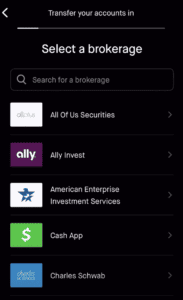
Choose "Transfer accounts into Robinhood"
Select Charles Schwab by typing it in the search bar
Enter your 8-digit Schwab account number
Confirm your account name (it must match!)
Answer whether your Schwab account has mutual funds or bonds
Choose full or partial transfer
Review all details and submit the transfer
5. What to Expect Next – Monitoring and Verifying Your Transfer
You can check the transfer status by tapping Account → History in the Robinhood app. You’ll see submitted, processing, and completed status updates.
Once complete, review your Robinhood account to make sure all positions and cash (including cash from fractional shares sold) arrived correctly.
Cost basis information for your transferred assets may take up to 15 days to show up in Robinhood. If it doesn't appear, contact Schwab to ensure the info was sent—or reach out to Robinhood support.
Keep your old Schwab account open for a few weeks to make sure no residual dividends/sweeps are left behind (Robinhood will automatically sweep these in for up to 6 months after your original transfer).
Troubleshooting: Common Transfer Issues (& Fixes)
Account names don't match between Schwab and Robinhood: Update one of the accounts so the name, address, and SSN match exactly.
Attempting to transfer unsupported accounts (trusts, custodial, business, etc.): Only supported account types work; convert your Schwab account if necessary.
Pending trades or unsettled transactions: Allow all trades to settle before trying again.
Non-transferable assets included: Consider manually selling or transferring these as cash.
Missing advanced trading approvals (like options): Secure approval in Robinhood before initiating a transfer with those holdings.
Rejected transfer: Robinhood will notify you—fix the indicated problem and resubmit.
Tax Considerations
Transferring assets via ACATS is not a taxable event for regular brokerage accounts; your cost basis moves with your shares.
Exceptions: Fractional shares that must be liquidated and transferred as cash will count as a sale for tax purposes (potential capital gains/losses).
Be aware of wash sale rules if you've sold assets at a loss and repurchase them at Robinhood within 30 days; consult a tax advisor if you're unsure.
IRA rollovers have separate rules—consult a tax professional for assistance to avoid early withdrawal penalties or accidental distribution tax bills.
Key Takeaways
Transfers from Schwab to Robinhood take 5–7 business days; make sure to match account types and double-check all details before submitting.
Straightforward assets like stocks and ETFs move smoothly; mutual funds, proprietary products, and crypto do not.
Robinhood reimburses up to $75 of Schwab’s transfer fee for qualifying incoming transfers—don’t leave free money on the table!
Monitor both accounts until all assets (and "residual sweeps") have settled, especially around dividend payment dates.
If you plan to trade options, have that feature enabled at Robinhood before starting your transfer.
Retain transfer confirmation emails and final statements from Schwab for your tax records.
By following this guide and using the provided checklist and tips, you can confidently transfer your investments from Charles Schwab to Robinhood—and enjoy the benefits of Robinhood’s latest technology and rewards.
Article written by Ryan Scribner
Ryan Scribner is the Co-Founder of Investing Simple and author of From Side Hustle To Main Hustle To Millionaire. He is also a host on the NerdWallet YouTube Channel and runs a successful personal finance YouTube channel he launched in 2016. Ryan has been featured in The Wall Street Journal, MarketWatch, Business Insider, and Forbes, which named his channel the #1 Must-Watch YouTube Channel for Making Money. Recognized as a Top 100 Money Expert by GoBankingRates + MoneyLion and selected again in 2025 — Ryan shares insights based on his own investing journey to help others build wealth.
Choosing the right product and service is essential for your investing. Here are some of the tools and services to help your portfolio grow.
Robinhood
Robinhood provides an easy-to-use commission free trading platform for beginner investors. Robinhood has $0 account minimums. Get a free stock when you open an account below. Limitations Apply.
M1 Finance offers a free investing platform where users can build portfolios of stocks and ETFs. Users can also choose from a variety of pre-built portfolios offered for free.
Passively invest in private real estate deals with as little as $10. Fundrise allows you to own residential and commercial real estate across the U.S. starting at a 1% annual fee.
Investing Simple is a financial publisher that does not offer any personal financial advice or advocate the purchase or sale of any security or investment for any specific individual. Members should be aware that investment markets have inherent risks, and past performance does not assure future results. Investing Simple has advertising relationships with some of the offers listed on this website. The information on Investing Simple could be different from what you find when visiting a third-party website. All products are presented without warranty. For more information, please read our full disclaimer.