FTC Disclosure: Some of the links on this site are affiliate links. Read our full disclaimer here.
How To Transfer From Uphold To Coinbase
If you currently have crypto stored with Uphold and want to transfer to Coinbase, you are in luck. This guide will walk you through every step, highlight common mistakes, and help you avoid costly errors when moving crypto from Uphold to Coinbase.
Common Mistakes to Avoid When Transferring Crypto:
Sending to the wrong blockchain network: Always match the network on both Uphold and Coinbase, or your funds may be lost forever.
Omitting required destination tags or memos: For coins like XRP, Stellar, etc., always include these if prompted.
Using the wrong wallet address: Double-check the copied address before confirming!
Failing to enable 2FA: Secure both your Uphold and Coinbase accounts with two-factor authentication.
Not verifying on both platforms: Ensure your accounts meet all KYC requirements before attempting any transfers.
Why might you want to transfer from Uphold to Coinbase? Some users seek lower fees, additional trading features (like Coinbase Advanced), improved user experience, or access to a larger range of assets (Coinbase now supports 240+ cryptocurrencies). Others may simply prefer Coinbase's interface or ecosystem.
Step 1: Verify Both Your Uphold and Coinbase Accounts
Before transferring, both accounts must be verified:
Uphold: Requires identity verification (KYC) using a government-issued ID and possibly address documentation. This unlocks withdrawal features and higher transaction limits. Uphold has daily, weekly, and monthly withdrawal limits based on your account tier and region—check your limits in the Uphold dashboard before large withdrawals.
Coinbase: Verification is also required. This is done by uploading a photo of your driver's license or another state-issued ID. You must have a verified account to receive crypto.
Step 2: Open or Upgrade Your Coinbase Account
With over 240 cryptocurrencies available for trading and even more to monitor, Coinbase has one of the largest collections among major US exchanges.
If you sign up for Coinbase using our button above, check if the $5 Bitcoin bonus or other rewards are still available—promotional offers are subject to change.
Coinbase now offers Coinbase Advanced, the replacement for Coinbase Pro. For lower trading fees, enhanced charting, and more order types, consider using Coinbase Advanced instead of the regular Coinbase interface.
Coinbase Standard: User-friendly, ideal for beginners.
Coinbase Advanced: For more active users, offers lower trading fees (starting at 0.60% maker / 1.20% taker at lowest volume tier) and additional trading features.
Visit the Coinbase dashboard and opt into Advanced if you require more control or lower costs for buying/selling after your crypto arrives.
Step 3: Gather Necessary Receive Information from Coinbase
You'll need to get the correct wallet address from Coinbase for the asset and blockchain you wish to transfer.
Network Matters:This is the #1 mistake! Always confirm which blockchain/network both Uphold and Coinbase support for the asset you want to transfer.
Example: For USDT, you may see options like Ethereum (ERC-20), Avalanche (AVAX), Solana, etc. Choose the exact same network on both exchanges.
Login to Coinbase, select the crypto asset you want to receive.
Click "Send/Receive" then select "Receive".
Select or confirm the correct network/blockchain.
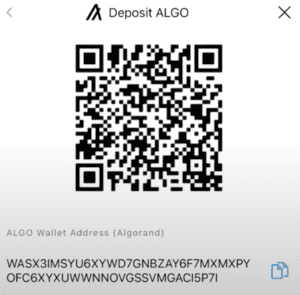
A popup will display a QR code, wallet address, and—if required—a destination tag or memo. If a tag/memo is shown (e.g., for XRP, XLM, etc.), it is required! Omitting it can result in permanent loss.
Copy the wallet address (and tag/memo, if required) using the "copy" function. Never type wallet addresses by hand. Double-check the first and last 4 characters to confirm accuracy.
For security, consider sending a small test transaction first to verify the address works before sending your full amount.
Security Best Practices:
Enable 2FA (Two-Factor Authentication) on both Uphold and Coinbase for maximum account protection.
Be aware of address poisoning scams—always copy wallet addresses directly from the Coinbase app/website and never trust addresses sent from unknown individuals.
Review recent withdrawal and transfer activity before proceeding.
Step 4: Initiate Crypto Transfer From Uphold to Coinbase
To initiate the transfer from Uphold:
Log in to the Uphold app or browser dashboard.
Select "Transact".
A new screen will appear with "From" and "To" options.
In "From", select the crypto you want to transfer.
Enter the exact coin amount or (optionally) the dollar amount.
In "To", select "Crypto Network".
Select the network (for example, if you’re transferring Bitcoin, select the Bitcoin (BTC) network; for Ethereum, select ERC-20/Ethereum Mainnet). It must match the network you selected on Coinbase.
Tap "Preview Withdrawal".
See a summary page—review all details carefully: asset type, destination address, network, transaction fee, and final withdrawal amount.
Paste the wallet address (and tag/memo if necessary) obtained from your Coinbase account.
Double-check the first and last few characters of the address as well as any additional details (tag, memo, etc.). If sending a large amount, do a test transfer first.
After confirming, tap "Confirm".
You’ll receive an email notification from Uphold once the transfer is initiated. Watch your Coinbase wallet for the incoming deposit.
Important Fee & Timing Information:
Uphold Withdrawal Fees: Network fees depend on the asset and network, typically ranging from 1.4%–2.95% for major cryptos.
Coinbase Deposit Fees: Coinbase does not charge fees to receive crypto, but may charge for conversions, trades, or withdrawals later. Review their current fee rates.
Expect transfer times to range from 10 minutes to several hours depending on blockchain congestion. Most transfers are completed in 30–90 minutes. For some assets or during high network congestion, it may take longer.
Quick Tip: If your crypto supports multiple networks (like USDT or USDC), choosing a faster or less congested network (like Solana or Polygon) may result in much lower fees. Make sure both Uphold and Coinbase support your chosen network—for some, Coinbase only supports select blockchains.
Step 5: Confirm Deposit in Coinbase
Check the status: Once the withdrawal is processed by Uphold, you can track progress using the transaction ID (TxID) in a blockchain explorer.
Coinbase will automatically credit your account once sufficient confirmations are received on the blockchain.
Typical confirmation times: Bitcoin: 1–6 confirmations (~10–60 min), Ethereum/Polygon/Solana: usually faster. Network congestion may extend these times.
What If Something Goes Wrong?
Funds are missing or delayed: Check the transaction status on both platforms. Use the TxID in a block explorer (e.g., blockchair.com) to confirm network status.
Sent to wrong address or network: Unfortunately, blockchain transfers are irreversible. Funds sent with the wrong network or incorrect address are often lost permanently.
Forgot to include destination tag/memo: For assets like XRP or XLM, contact Coinbase support immediately with your TxID. Resolution is not guaranteed and may require a lengthy process.
Transfer appears stuck/unconfirmed: This usually indicates network congestion—wait a few hours before contacting support.
Security & Best Practices for Crypto Transfers
Enable 2FA (two-factor authentication) on both Uphold and Coinbase.
Always use unique, complex passwords and change them periodically.
Use the “whitelist” address feature (on Coinbase Advanced) to auto-approve only verified addresses.
Never trust wallet addresses sent via email, DM, or social media.
If unsure, contact customer support on Uphold or Coinbase before sending a large transfer.
Additional Tips & FAQs
Uphold Withdrawal Limits: These vary by account level (verified/unverified), region, and currency. Check your personal dashboard for limits before moving large sums.
Test Transactions: Always send a small amount first, verify receipt, then transfer the remainder.
Alternative Transfer Methods: Some users convert to stablecoins (like USDC) before transfer, or use Layer 2 networks for faster/cheaper transactions if both exchanges support them.
Updated Tax Regulation: Beginning in 2025, crypto sales and exchanges (not plain wallet transfers) are subject to IRS Form 1099-DA reporting. Receiving/sending between your personal wallets is not taxable, but keep your records for accurate tax reporting.
Summary: The Safe, Modern Way to Move Crypto from Uphold to Coinbase
Stay up-to-date, double-check all details (especially network selection and destination tags), factor in all applicable fees, and use robust security settings (including 2FA and whitelists).
Successful crypto transfers always come down to preparation, verification, and caution. If you're ever unsure, send a test transfer—it's worth the peace of mind!
Article written by Ryan Scribner
Ryan Scribner is the Co-Founder of Investing Simple and author of From Side Hustle To Main Hustle To Millionaire. He is also a host on the NerdWallet YouTube Channel and runs a successful personal finance YouTube channel he launched in 2016. Ryan has been featured in The Wall Street Journal, MarketWatch, Business Insider, and Forbes, which named his channel the #1 Must-Watch YouTube Channel for Making Money. Recognized as a Top 100 Money Expert by GoBankingRates + MoneyLion and selected again in 2025 — Ryan shares insights based on his own investing journey to help others build wealth.
Choosing the right product and service is essential for your investing. Here are some of the tools and services to help your portfolio grow.
Robinhood
Robinhood provides an easy-to-use commission free trading platform for beginner investors. Robinhood has $0 account minimums. Get a free stock when you open an account below. Limitations Apply.
M1 Finance offers a free investing platform where users can build portfolios of stocks and ETFs. Users can also choose from a variety of pre-built portfolios offered for free.
Passively invest in private real estate deals with as little as $10. Fundrise allows you to own residential and commercial real estate across the U.S. starting at a 1% annual fee.
Investing Simple is a financial publisher that does not offer any personal financial advice or advocate the purchase or sale of any security or investment for any specific individual. Members should be aware that investment markets have inherent risks, and past performance does not assure future results. Investing Simple has advertising relationships with some of the offers listed on this website. The information on Investing Simple could be different from what you find when visiting a third-party website. All products are presented without warranty. For more information, please read our full disclaimer.