






With the advent of digital wallets and online banking services, transferring money between various platforms has become more accessible than ever.
Apple Pay and Chime are two platforms that have revolutionized how we manage our finances.
This article will guide you on seamlessly transferring funds from Apple Pay to Chime, providing step-by-step instructions.
Before transferring funds, you need to understand that Apple Pay and Chime cannot be directly linked. Instead, you'll transfer money from your Apple Pay Cash balance to your Chime checking account using standard bank transfer methods.
Important distinction: Adding your Chime debit card to Apple Pay allows you to spend your Chime balance using Apple Pay, but this is different from transferring money to your Chime account. This guide covers the latter process.
Unlike what some guides suggest, you don't "connect" Chime to Apple Pay. Instead, you'll need your Chime bank account details:
Chime routing number: 084009519 (for The Bancorp Bank, which partners with Chime)
Important: Chime uses partner banks (The Bancorp Bank or Stride Bank), so your specific routing number may vary. Always use the one shown in your Chime app.
Look for an app that looks like this on your iPhone.
Open this app.
From here, you will need to tap on the Apple Cash card.

Look for a card that looks like the above.
From here, click on the three dots on the top right corner to open the menu for your Apple Cash balance.
From here, select the option to transfer your funds to the bank.
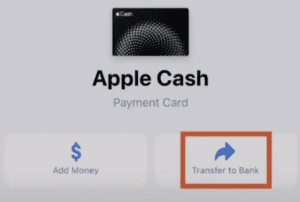
This will prompt you to add a new bank account via routing and account numbers. You'll need to enter your Chime routing number (084009519) and your Chime account number that you gathered earlier.
At this point, you can enter the dollar amount you want to transfer from Apple Pay to your Chime account.
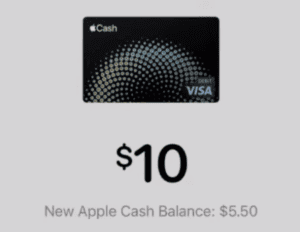
Your "New Apple Cash Balance" will reflect the new balance you will have after initiating the transfer.
Depending on how soon you need the funds, you can transfer funds instantaneously. Or, you can opt for the standard 1 to 3 business day transfer.
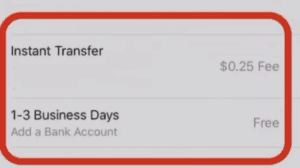
Current fee structure:
Apple Cash has the following transfer limits:
Note: Unverified accounts have lower limits. If you need to transfer more than $10,000, you'll need to do multiple transfers across different days or wait for your 7-day rolling window to reset.
Starting in 2024, Apple requires identity verification for full Apple Cash functionality:
If your transfer doesn't work as expected:
Yes, but through a different process. You would transfer from your Chime account to your linked external bank account, then add those funds to Apple Cash.
Apple Pay is the payment system that lets you pay with your iPhone, while Apple Cash is the digital wallet within Apple Pay that holds your money balance.
Yes. Both Apple Cash (through Green Dot Bank) and Chime (through partner banks) offer FDIC insurance up to $250,000 per depositor.
Instant transfers typically arrive within 30 minutes (with fee), while standard transfers take 1-3 business days (free).
Once confirmed, transfers cannot be reversed. Standard transfers may be canceled within a short window (usually 30 minutes), but instant transfers cannot be canceled.