





Crypto.com and Trust Wallet are both well respected digital asset platforms with distinct advantages for different use cases.
Trust Wallet offers self-custody and direct blockchain access, while Crypto.com provides integrated exchange services and payment features. Understanding how to safely transfer between these platforms is essential for maximizing your crypto experience.
Below are the detailed, up-to-date steps required to transfer from Trust Wallet to Crypto.com, including critical network selection guidance and security considerations that many guides overlook.
New to the world of Crypto? Check out my full Coinbase tutorial below!
Before starting your transfer, be aware that cryptocurrency transactions are irreversible and network selection is critical. Sending funds on the wrong blockchain network is the #1 cause of lost funds. This guide focuses on transferring to the Crypto.com App (the custodial platform), not the Crypto.com Exchange or Crypto.com Onchain (self-custodial wallet).
Security First: Crypto.com will never ask for your private keys or seed phrase. Never share these with anyone claiming to be from Crypto.com support.
Test Transfer Recommendation: Always send a small test amount first (e.g., $5-10 worth) to verify the process works before transferring larger sums. This simple step prevents catastrophic losses from address errors.

Before you can send your coins over to Crypto.com, you'll need a fully verified account. Crypto.com requires complete KYC (Know Your Customer) verification including government-issued identification and address verification.
You should also take the time to complete all verification steps to ensure you don't have any account limitations or restrictions. Verification can take anywhere from a few hours to several business days depending on your jurisdiction.
Important: Ensure you're using the official Crypto.com app or website. Bookmark the official site to avoid phishing scams. The correct URL is https://crypto.com/app
Cryptos are stored inside digital wallets, each with a unique address. In order to send coins between wallets, you'll need the correct wallet address to send it to the right place.
While that can sound complex, locating the right crypto address in Crypto.com is straightforward:
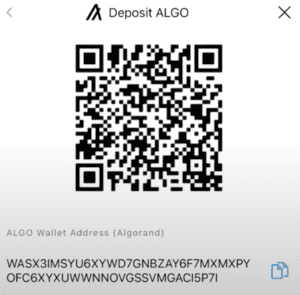
We'll be using this address inside Trust Wallet to initiate a transfer to Crypto.com.
Now, it's time to move over to Trust Wallet to send the crypto over. Click on send, and then search for the crypto you are looking to send over.
Make sure this matches the type of cryptocurrency for the wallet you copied earlier! This is where most users make mistakes - sending the wrong token type or on the wrong network.
When your account is opened and verified and you have copied your destination address, it's time to send your crypto:
Network fees vary significantly depending on which blockchain you select:
These fees are paid to the blockchain network, not to Crypto.com or Trust Wallet. Higher fees typically mean faster confirmation times.
Estimated confirmation times:
Remember to always leave enough of the native token (ETH for Ethereum network, MATIC for Polygon, etc.) in your Trust Wallet to cover the network fee. Without this, your transaction will fail.
Transfer not showing up? Most transfers take 10-30 minutes, but during periods of high network congestion, it could take longer. Check the transaction status on a blockchain explorer by searching for your transaction hash.
Wrong network selected? If you sent funds on the wrong network (e.g., sent ERC-20 USDT to a TRC-20 address), your funds may be lost permanently. Contact Crypto.com support immediately with your transaction hash - they may be able to recover funds if the amount is significant ($300+).
Missing destination tag? For XRP, XLM, and similar coins, if you forgot the destination tag, your funds are likely stuck. Contact Crypto.com support with your transaction hash and they can often retrieve them.
Unsupported cryptocurrency? Crypto.com doesn't support every token. Check their official list of supported assets before transferring. Sending unsupported tokens will result in permanent loss.
Q: How long does it take for transfers to complete?
A: Most transfers complete within 10-30 minutes, but this varies by network. Bitcoin and Ethereum can take longer during peak times, while networks like Solana and XRP are nearly instant.
Q: Can I reverse a transfer if I made a mistake?
A: Cryptocurrency transactions are generally irreversible. This is why the test transfer recommendation is so important. If you sent funds to the wrong address, contact both Trust Wallet and Crypto.com support immediately with your transaction hash - recovery is possible in some cases but not guaranteed.
Q: Why does my transfer cost so much?
A: Network fees fluctuate based on blockchain congestion. Ethereum fees can spike during market volatility. Consider using a different network (like Polygon for USDT) if fees are too high.
Q: What if I send the wrong amount?
A: If you sent too little, you'll need to send more. If you sent too much, unfortunately you cannot reverse the transaction. Always double-check amounts before confirming.
Q: Is this process safe?
A: When done correctly with proper security measures (2FA, address verification, test transfers), it's very safe. The biggest risks come from user error (wrong address/network) or phishing scams. Never share your seed phrase with anyone.
To protect your assets during transfers:
Remember that cryptocurrency transactions are irreversible. Taking a few extra minutes to verify details can prevent catastrophic losses.
Transferring between Trust Wallet and Crypto.com is straightforward when you understand the critical details about network selection and security practices. By following these guidelines, you can move your assets safely and efficiently between these platforms.
Always remember the golden rule of cryptocurrency: Not your keys, not your coins. When funds are in the Crypto.com App, Crypto.com holds your private keys. For maximum security of larger holdings, consider using a hardware wallet in conjunction with Trust Wallet.
Get 1 Free Stock Worth Up To $200 From Robinhood!
Don't Miss This Opportunity!
Investing Simple readers can claim a free stock from Robinhood worth up to $200 when they open a brokerage account and deposit any amount.
For US Residents only. Investing Simple is affiliated with Robinhood, and we may earn a commission when you sign up for Robinhood.